6 Theming
A theme is one atomic value — plain data, not a mechanism:
typ.theme(
  palette: (:),       // named colours/paints exposed to document code
  node-presets: (:),  // node kind -> partial node style
  edge-defaults: (:), // partial style applied to every edge
  edge-presets: (:),  // preset name -> partial edge style
)
typ.neutral-theme is typ.theme() with all four dictionaries empty — it’s what typ.diagram uses if you never pass theme: at all, which is why a bare node() renders with no shape until a theme says otherwise.
Themes are atomic at the renderer boundary: selecting one theme replaces the whole value, and diagram() never guesses how to combine two themes. If a theme should extend another, that composition happens explicitly, in the theme file, with ordinary dictionary operations — there is no implicit merging anywhere in the renderer.
typograph itself ships no bundled theme — it’s a neutral engine, useful directly with per-call style: dictionaries, or with a theme you write. For complete, ready-made themes built entirely on the API this chapter describes, see typograph-zx (ZX-calculus notation) and typograph-circuit (quantum-circuit and continuous-variable circuit notation). They are real theme packages rather than toy examples.
6.1 Writing your own theme file
A theme file is an ordinary Typst module. It imports the public package API it needs — theme, node-type, edge-type, shapes — and exports a theme value plus whatever semantic constructors go with it:
// my-theme.typ
#import "@preview/typograph:0.3.0" as typ

#let pentagon = typ.node-type("pentagon")

#let node-presets = (
  pentagon: (
    shape: typ.shapes.regular(vertices: 5, rotate: -90deg),
    fill: rgb("#f2e8ff"),
    stroke: 0.8pt + purple,
    min-size: 13pt,
    inset: 3pt,
  ),
)

#let edge-presets = (
  link: (stroke: (paint: gray, dash: "dashed")),
)
#let link = typ.edge-type("link")

#let theme = typ.theme(
  node-presets: node-presets,
  edge-presets: edge-presets,
)
The document imports and binds that file once:
#import "@preview/typograph:0.3.0" as typ
#import "my-theme.typ": theme as my-theme, pentagon, link

#let diagram = typ.diagram.with(theme: my-theme)

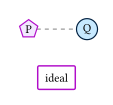
#diagram({
  let p = pentagon(0, 0, label: [P])
  let q = typ.node(1.4, 0, label: [Q], style: (shape: typ.shapes.circle, fill: rgb("#c7e9ff"), stroke: 0.8pt + navy, min-size: 13pt, inset: 3pt))
  link(p, q)
})
Two things in that theme file are easy to get wrong the first time:
Composition is shallow and explicit, on purpose. If you’re extending an existing theme rather than starting from empty — classic.node-presets.z + (fill: ..), say — that + keeps every other field the original preset already had and only overrides what you name. Writing z: (fill: blue) instead would replace the whole preset — discarding shape, shape-labelled, min-size, and inset along with it, since a theme never tries to guess which fields you meant to keep. When in doubt, extend an existing preset dictionary with + rather than writing a new one from scratch.
The import is not boilerplate you can drop. Typst modules don’t inherit bindings from whoever imports them — a theme file that calls typ.node-type, typ.theme, or typ.shapes.* has to import those names itself, even though the document using the theme already imported typ too. Passing a bundle of package functions into an import-free factory function is technically possible, but it adds a layer of indirection to every theme file just to avoid one import line, which is a bad trade. A theme file with no package-specific calls — pure data, referencing only colours it already has a reference to — can stay import-free.
6.2 Defining new node and edge kinds
A theme file isn’t limited to restyling kinds that already exist elsewhere — pentagon and link above are both brand new, declared the same one-line pattern regardless of what they draw:
#let pentagon = typ.node-type("pentagon")
#let link = typ.edge-type("link")
and then giving "pentagon"/"link" an entry in node-presets/ edge-presets. There’s no separate mechanism for “restyling a bundled kind” versus “declaring a new one” — both go through the identical factory. See node-type() and edge-type() for the factories themselves, and Directional shapes and flip if the new kind’s shape should support flip:.
This is also the direct answer to “can I restyle box()/gate(), or are they special?” — they aren’t special. box and gate ship with a small, neutral, functional default inside the package only so a document that imports no theme at all still has something immediately usable; every part of their appearance is themeable through the ordinary node-presets mechanism, exactly like any other kind:
typ.gate(0, 0, [ideal], style: (stroke: 1pt + purple))is the direct, call-site version of the same override a theme would put in node-presets.gate (or node-presets for a custom kind: "ideal-gate", if only some gates in the document should get the purple outline). The figure above includes exactly this: the “ideal” box is an otherwise-default gate with nothing but its outline colour changed.
Why this split — a themeable engine with no bundled appearance of its own — is drawn exactly here is covered in Architecture.