typograph
1 Introduction
typograph draws diagrams — nodes, edges, curves, ports, highlights, and reusable fragments — with Typst’s native graphics. No CeTZ, no LaTeX/TikZ dependency. It has no opinion about what a node should look like; a document supplies that itself, or through a theme.
1.1 Engine and visual languages, separated on purpose
Most diagramming libraries fuse a drawing engine and a visual language into one thing. This project keeps them separate:
typograph(this package) is a neutral engine. It knows how to lay out nodes and edges, resolve styles, clip wires to silhouettes, and draw — but it has no built-in notion of what any particular kind of node should look like.typograph-zxis a companion package built entirely on typograph’s public API: ZX-calculus and continuous-variable ZX-calculus notation — spiders, Hadamards, multipliers, Pauli-web highlighting — as a complete, ready-to-use theme.typograph-circuitsupplies quantum-circuit and continuous-variable circuit notation, also entirely through the public theme and constructor APIs.
Nothing from a companion package is applied unless a document asks for it:
#import "@preview/typograph:0.3.0" as typ
#import "@preview/typograph-zx:0.2.0" as zx
#let diagram = typ.diagram.with(theme: zx.theme)
Binding a theme is the entire coupling between “drawing engine” and “visual language” — typ.diagram alone renders a completely neutral diagram, every node invisible until you give it a shape. This is why a generic node like box() or gate() ships inside typograph rather than in a theme package (the engine needs some useful default so it’s not useless out of the box) while remaining fully restylable through the same theme mechanism as anything else — see Theming for a gate with a custom outline colour.
The Developer Guide goes into why this split exists and what it costs.
1.2 Install and import
From a Typst package installation:
#import "@preview/typograph:0.3.0" as typOr, working inside this repository, import the source directly:
#import "/src/lib.typ" as typtypograph has no bundled theme of its own to bind — it’s directly useful with your own style: dictionaries, and you can build up a full theme when you want one (see Theming). To draw ZX-calculus diagrams specifically, add typograph-zx and bind its theme:
#import "@preview/typograph:0.3.0" as typ
#import "@preview/typograph-zx:0.2.0" as zx
#let diagram = typ.diagram.with(theme: zx.theme)
Bind a theme once and reuse that binding throughout the document — this is the idiomatic entry point for everything that follows.
1.3 Quick start
Diagram coordinates use the mathematical convention: x increases to the right and y increases upward.
quickstart.typ
// Generates docs/img/quickstart.svg — the quick-start diagram from the
// Introduction chapter.
//   typst compile --root . --ignore-system-fonts docs/img/quickstart.typ docs/img/quickstart.svg
#import "../../src/lib.typ" as typ
#let node = typ.node-type("node", base-style: (
  shape: typ.shapes.circle, shape-labelled: typ.shapes.stadium,
  fill: aqua.lighten(70%), stroke: 0.6pt + teal, min-size: 12pt, inset: 4pt,
))
#set page(width: auto, height: auto, margin: 8pt)

#typ.diagram({
  let a = node(0, 0, label: [A])
  let b = node(1, 0, label: [B])
  typ.edge(a, b)
  typ.edge(a, (-1, 0))
  typ.edge(b, (2, 0))
})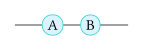
An edge automatically contributes the nodes at its endpoints — edge(a, b) draws a, b, and the wire between them. A node with no edge touching it has nothing to contribute it, so it must be emitted as a bare statement:
#diagram({
  let k = typ.node(0, 0, label: $k$, style: (shape: typ.shapes.bare))
  k
})
1.4 Where to go next
- Core Concepts explains how a diagram body collects nodes, edges, and content, and how style resolution works everywhere in the package.
- Drawing Nodes, Shape Builders, and Drawing Edges cover the building blocks in depth — including every curve control and the waypoint system.
- Theming walks through writing a complete custom theme file, from an empty palette to a restyled gate.
- ZX Theme covers
typograph-zx: its constructors, its bundled appearance, and how to extend it. - Circuit Theme covers the focused quantum-circuit and continuous-variable gate vocabulary.
- The Reference section is the exhaustive, lookup-first version of everything the guide introduces narratively.